Guides
Asset Lifecycle Records: Warranty, Repair, and Status
Track warranty dates, repair history, condition, status, and disposal evidence so small teams can make cleaner lifecycle decisions.
Capture lifecycle-record depth around warranty, repair history, status, and disposal evidence while supporting maintenance and refresh-cycle pages.
- Asset Lifecycle Management Hub · hub overview
- The Anatomy of an Asset Lifecycle: From Purchase to Disposal · related article
- Condition Tracking: When to Repair vs Replace for Teams · related article
- Laptop Refresh Cycle Policy: 3-Year vs 4-Year Guide · related article
Audience: Small IT and operations teams deciding when to repair, replace, warranty, retire, or dispose of assets
How To Run Inventory Sessions · guide
Maintenance Scheduling · feature page
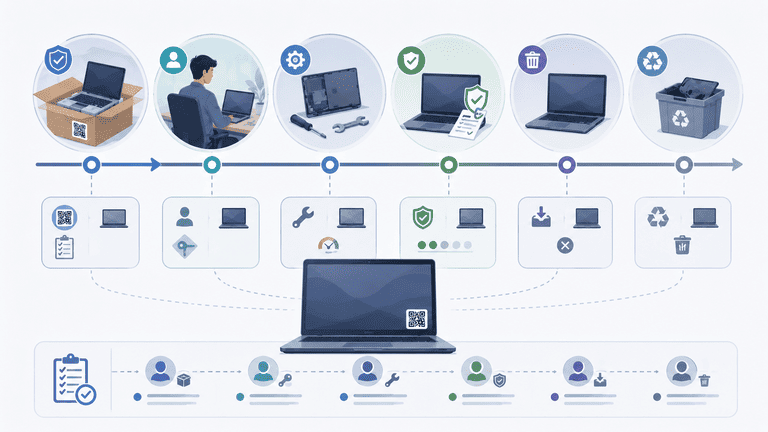
Asset lifecycle records help small teams decide what to repair, what to replace, and what needs attention before it creates downtime. The useful record is not a long archive. It is a clear history that supports the next decision.
TL;DR
- Track status, condition, warranty date, and repair history together.
- Use lifecycle records to make repair-vs-replace decisions.
- Keep evidence attached to the asset, not scattered across inboxes.
- Review aging assets before budget planning, not after failure.
What a Lifecycle Record Should Include
For small IT and operations teams, a practical lifecycle record includes:
| Field | Why it matters |
|---|---|
| Purchase or received date | Starts the lifecycle clock |
| Current status | Shows if the asset is assigned, spare, repair, retired, or missing |
| Condition | Helps decide whether the asset is usable |
| Warranty end date | Prevents missed repair coverage |
| Repair notes | Shows repeated failure patterns |
| Replacement target | Supports budget planning |
| Disposal evidence | Keeps end-of-life records audit ready |
For full lifecycle context, see The Anatomy of an Asset Lifecycle.
Why Warranty Tracking Matters
Warranty dates are easy to ignore until a device fails. Then the team wastes time searching receipts, emails, and vendor portals.
Track warranty data when the asset is created:
- warranty end date
- supplier or vendor
- purchase reference
- support notes
- repair ticket link or note
This keeps the repair path clear when something breaks.
Repair History Signals
Repair history is useful when it changes a decision:
- repeated failures on the same device
- repairs costing more than replacement value
- equipment unavailable too often
- patterns by model or supplier
- damage linked to specific use cases
For repair decisions, use Condition Tracking: When to Repair vs Replace.
Lifecycle Stages
Use a short lifecycle model:
| Stage | What to record |
|---|---|
| Planned | Expected purchase or replacement need |
| Received | Purchase date, vendor, warranty, serial |
| Available | Ready for assignment |
| Assigned | Owner, location, assignment date |
| In repair | Issue, repair note, expected return |
| Retired | Reason, date, disposal path |
| Disposed | Evidence, certificate, final status |
Do not create statuses that do not trigger work. Every stage should tell the team what happens next.
Maintenance Review Cadence
Small teams can review lifecycle records monthly or quarterly.
Monthly review:
- assets marked needs attention
- assets currently in repair
- assets with repeated issues
- assets required for upcoming onboarding
Quarterly review:
- assets nearing warranty end
- laptops nearing refresh threshold
- shared equipment with high repair volume
- retired assets waiting for disposal evidence
This cadence prevents lifecycle work from becoming a once-a-year scramble.
Example: Laptop Lifecycle Record
A practical laptop record might include:
- model and serial number
- assigned employee
- purchase date
- warranty end date
- condition
- last verified date
- repair notes
- refresh target
- return status
That record helps answer common questions quickly: should we repair this, replace it, reassign it, or retire it?
Repair vs Replace Decision Example
A lifecycle record becomes valuable when it changes a decision. Consider a laptop that is four years old, outside warranty, and has two recent repair notes.
The team can review:
- current condition
- warranty status
- repair history
- replacement target
- user impact
- available spare equipment
If the laptop is assigned to a critical role and repairs are repeated, replacement may be the better decision. If it is a spare device with a minor issue, repair may still be reasonable. The point is not to automate the answer. The point is to keep the evidence in one place.
Status Rules
Avoid too many statuses. Small teams usually need:
- assigned
- available
- in repair
- needs attention
- retired
- missing
Each status should have a next action. If no one knows what a status means, remove it.
Budget Planning
Lifecycle records make budget planning less reactive. Instead of waiting for failure, review:
- assets older than the refresh threshold
- assets with repeated repair notes
- assets outside warranty
- assets marked needs attention
- high-use shared equipment
Pair this with Laptop Refresh Cycle Policy for IT equipment.
Audit and Disposal
End-of-life records matter for compliance and cost control. When an asset is retired, keep:
- retirement date
- reason
- disposal method
- certificate or evidence if needed
- final owner or approver
Use Auditable Asset Disposals for disposal checklist details.
Lifecycle Reports to Keep
Small teams do not need a complex lifecycle dashboard at the start. A few saved views are enough:
| Report | What it catches |
|---|---|
| Warranty ending soon | Repair coverage risk |
| Repeated repair notes | Replacement candidates |
| Needs attention | Assets blocking assignment |
| Retired but not disposed | Incomplete closeout |
| Outside refresh target | Budget planning |
Review these views before budget conversations. That gives the team specific assets to discuss instead of vague replacement estimates.
Mistakes to Avoid
Tracking history only in notes
Free-text notes are hard to report on. Use structured fields for status, condition, warranty, and retirement state.
Waiting for failure
Lifecycle records are most useful before equipment fails. Review aging and repair patterns early enough to budget.
Keeping retired assets active
Retired assets should not stay mixed with active inventory. That creates false counts and audit confusion.
Losing disposal evidence
If disposal certificates or approvals matter, attach or reference them in the asset record before closing the item.
FAQ
Do small teams need lifecycle management?
Yes, but it should be lightweight. Start with warranty date, condition, repair history, and retirement status. Add more only when it improves decisions.
Is depreciation required?
Not always. Some teams need depreciation for finance. Others only need replacement planning. Keep the lifecycle model aligned with your actual reporting needs.
Next Step
Pick one high-value category, such as laptops or shared monitors. Add warranty date, condition, and repair notes. Review those fields after one month and use them to identify the first repair-vs-replace decision.
Methodology
- This page was reviewed against adjacent InvyMate workflow pages and the external references listed below.
- Recommendations are written for practical asset-tracking operations and are intended to stay specific about workflow scope, tradeoffs, and implementation boundaries.
Related Standards and Guidance
- IAS 16 Property, Plant and Equipment · IFRS Foundation
- CIS Critical Security Control 1: Inventory and Control of Enterprise Assets · Center for Internet Security
Try InvyMate
Start tracking assets with QR codes and scheduled audits.