Guides
Multi-Location Asset Tracking for Small Businesses
A practical multi-location asset tracking workflow for small businesses managing offices, storage rooms, remote employees, and location changes.
Own distributed-location workflow intent and route readers into transfers, audits, and remote asset ownership guides.
- IT Asset Management Hub (Small IT Teams) · hub overview
- Multi-Location Asset Transfers: Processes That Scale · related article
- Office Move Equipment Checklist for Asset Tracking · related article
- Remote and Hybrid Asset Tracking Workflow Checklist · related article
Audience: Small businesses tracking assets across offices, departments, storage rooms, and remote employees
How To Run Inventory Sessions · guide
Asset Assignment History · feature page
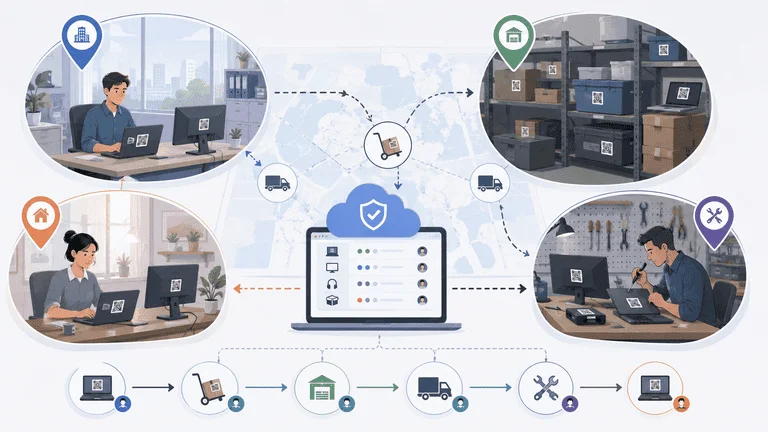
Multi-location asset tracking is not just a map of where equipment lives. For small teams, it is a way to prevent ownership drift when assets move between offices, floors, classrooms, storage rooms, and remote employees.
TL;DR
- Track location, owner, status, and last verification together.
- Treat every transfer as a small chain-of-custody event.
- Start with locations your team can actually audit.
- Use simple rules before adding formal approval steps.
Why Multi-Location Tracking Breaks
Small teams usually do not lose control because they lack a location field. They lose control because location updates are not tied to real work.
Common failure points:
- assets move between offices without a traceable location update
- storage rooms become informal holding areas
- remote employees keep equipment after role changes
- teams use different naming conventions for locations
- audits verify one site but ignore another
For transfer process detail, see Multi-Location Asset Transfers.
Minimum Location Model
Start with a location model that people understand:
| Level | Example | Why it matters |
|---|---|---|
| Site | Belgrade office | Groups audits and ownership |
| Area | IT storage | Helps find assets physically |
| Assignee | Employee or team | Shows who is responsible |
| Status | Assigned, spare, repair, missing | Explains what should happen next |
Do not create a location tree so detailed that staff avoid using it.
Transfer Workflow
A practical transfer has five steps:
- Confirm the asset and current owner.
- Record the destination site or person.
- Add a reason for the move.
- Update status if the asset changes state.
- Verify the item after arrival.
This is enough for most small teams. If the item is expensive or sensitive, require a documented approval step before updating the asset record.
Location Naming Rules
Bad location names create reporting problems. Before rollout, agree on names that will still make sense in six months.
Use names like:
Belgrade Office - IT StorageBerlin Office - Meeting Room 2Remote - Employee AssignedRepair VendorEducation Lab - Tablet Cart A
Avoid:
back roommain officeJohn's shelfold storagetemporary
Temporary names become permanent quickly. If the location is temporary, add a status or note instead of turning it into a vague location.
Transfer Evidence
For higher-value assets, a transfer should leave enough evidence to answer:
- who moved it?
- when did it move?
- where did it come from?
- where did it go?
- was it verified after arrival?
You do not need a heavy approval system for every item. But expensive or sensitive equipment should not move without a traceable update.
Multi-Location Reporting
Useful reports include:
| Report | Use |
|---|---|
| Assets by site | See what each office should have |
| Unverified by location | Plan audits by site |
| Recent location changes | Confirm moves were completed |
| Missing by location | Find weak control points |
| Assigned remote assets | Track home-office equipment |
These reports are only useful if the location model is clean. If staff use inconsistent location names, reporting turns into cleanup.
Storage Rooms and Shared Spaces
Storage rooms often create the most drift because no single employee feels responsible for every item inside them. Treat shared storage as a controlled location, not a vague holding area.
For each shared space, define:
- who owns the location
- which assets are allowed there
- how often the room is verified
- what status spare equipment should use
- how assets leave the location
This prevents storage from becoming a place where missing, retired, damaged, and available assets all look the same. A clean storage location makes transfers easier because staff know whether an item is ready to assign or still needs review.
Example Rollout
Week 1:
- define location names
- import one site or asset category
- assign owners
- label high-movement items
Week 2:
- run one location audit
- record location changes
- review exceptions
- fix naming problems
Week 3:
- add the next location
- repeat the same workflow
- compare exception rates across sites
This staged rollout is slower than importing everything at once, but it produces better data.
Auditing Across Locations
A multi-location audit should answer:
- What is at this site?
- What is assigned to people from this site?
- What has not been verified recently?
- What moved since the last audit?
- What is missing, damaged, or waiting for return?
Pair this with Inventory Audit Checklist when building the recurring process.
Remote and Hybrid Teams
Remote work adds a special case: the asset location may be a person, not an office.
For remote employees, track:
- employee name
- shipping date
- assigned equipment
- return status
- last verification date
- offboarding checklist status
Use Track IT Assets for Remote Employees for the deeper workflow.
FAQ
Should remote employees be treated as locations?
Usually no. Treat the employee as the assignee and use a remote status or location group for reporting. This keeps responsibility clearer.
Do small teams need transfer approvals?
Only for higher-value, sensitive, or high-loss assets. Most teams can start with assignment or location history and verification before adding formal approval steps.
What is the first location to audit?
Start with the place where equipment most often disappears: IT storage, loaner shelves, shared rooms, or a high-churn office.
Buyer Checklist
When evaluating software, ask:
- Can we filter assets by site, room, owner, and status?
- Can transfers show who changed what and when?
- Can remote assets be tracked without fake office locations?
- Can each site run a short audit?
- Can reports be exported by location?
Next Step
Pick three location levels and standardize their names. Then run one location audit using those names. If the team can find assets faster after that, expand the model.
Multi-location tracking works when the structure is simple enough to keep current.
Methodology
- This page was reviewed against adjacent InvyMate workflow pages and the external references listed below.
- Recommendations are written for practical asset-tracking operations and are intended to stay specific about workflow scope, tradeoffs, and implementation boundaries.
Related Standards and Guidance
- CIS Critical Security Control 1: Inventory and Control of Enterprise Assets · Center for Internet Security
- NIST SP 800-171 Rev. 3 · NIST
Try InvyMate
Start tracking assets with QR codes and scheduled audits.