Technology
Cloud Asset Tracking Software vs On-Prem: Small-Team Guide
Compare cloud asset tracking software with on-prem systems for small IT teams by setup time, operating cost, maintenance overhead, and reliability.
Cloud asset tracking software is usually the lower-overhead choice for a small IT team comparing setup speed, admin burden, remote access, and how quickly it can trust its asset data.
Introduction
Small IT teams often compare cloud and on-prem asset tracking at the same moment they are trying to fix spreadsheet drift, unclear ownership, or slow return workflows.
That means the real question is not just "Where should the software run?"
It is:
- how much infrastructure can we realistically maintain?
- how fast can we roll this out?
- will remote and hybrid staff be easy to support?
- how much manual admin work are we adding?
For most lean teams, cloud wins because it reduces operational weight. On-prem can still fit, but only when there is a real hosting or compliance reason.
If the decision is specifically about choosing a hosted asset-tracking product, continue with the Cloud Asset Tracking Software: Small-Team Buyer Guide.
Cloud vs. On-Prem Asset Tracking Software: Quick Decision
Cloud asset tracking software is hosted by a provider, while on-premise asset tracking runs on infrastructure your organization controls. For a small IT team, cloud is usually the lower-overhead choice; on-premise can be the better fit when local hosting, compliance, or internal infrastructure control is a real requirement.
| If your situation is... | Choose |
|---|---|
| Replacing spreadsheets | ✅ Cloud |
| One office plus remote staff | ✅ Cloud |
| Multiple locations | ✅ Cloud |
| Government or defense constraints | ✅ On-prem |
| Strict local-hosting rules | ✅ On-prem |
What Choosing On-Prem Actually Changes
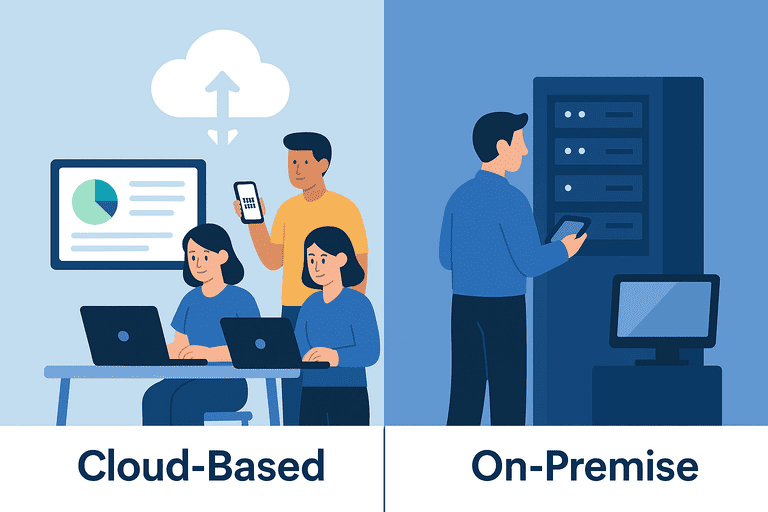
On-prem systems run on infrastructure your organization controls.
That usually means:
- more control over hosting
- more responsibility for updates, backups, and uptime
- more internal work around security patching and monitoring
- slower rollout for smaller teams
- internal responsibility for restore testing, access controls, and infrastructure capacity
For organizations with genuine local-hosting requirements, that may be acceptable. For a small team already stretched thin, it is often extra work with limited operational upside.
What Choosing Cloud Actually Changes
Cloud systems are delivered through the web and mobile access.
That usually means:
- faster deployment
- lower infrastructure overhead
- easier support for remote or multi-site teams
- hosting, updates, and some backup or recovery work handled by the provider, depending on the plan
Cloud is not a security or recovery guarantee by itself. Provider capabilities, plan scope, configuration, access controls, backup commitments, and data-residency terms all need to be checked before choosing a system.
Decision Matrix for Small IT Teams
| Decision point | Cloud | On-prem |
|---|---|---|
| Setup speed | Faster | Slower |
| Admin burden | Lower ongoing infrastructure work | Higher internal maintenance work |
| Remote / hybrid support | Strong by default | Usually needs more setup |
| Scaling users or locations | Easier | Heavier planning |
| Backup and recovery responsibility | Provider capability and contract scope | Internal design, monitoring, and restore testing |
| Access control and data location | Provider controls plus customer configuration and data-residency terms | Internal policy, infrastructure, and access administration |
| Total operating cost | Subscription plus the work included in the plan | Infrastructure, maintenance, and internal IT time |
| Best fit | Lean teams that need momentum | Teams with a real local-hosting requirement |
Cost Is Not Just the Subscription
The real comparison is not simply "Which is cheaper?"
It is:
Which option costs less to operate over the next three years?
For many small teams, on-prem costs include:
- server hardware
- storage
- backup design and monitoring
- upgrade work
- security patching
- ongoing IT time
Cloud shifts much of that burden into a more predictable subscription model. That does not mean cloud is always cheaper in every environment; compare the provider's plan scope with the internal time and infrastructure you would actually need.
What to Verify Before Choosing
Use the same checklist for both deployment models:
- Can the team export its asset data in a usable format?
- Where is data stored, and do residency rules apply?
- Are role-based access, audit history, and ownership changes supported?
- What exactly is included in backups, recovery, and restore testing?
- Does the workflow require reliable connectivity, or is offline capture supported?
- Which integrations, imports, and API limits matter on the first rollout?
Offline behavior is product-specific. Verify the actual mobile workflow rather than assuming that a cloud or on-premise label answers the question.
Why Cloud Usually Wins for Lean Teams
1. Faster path out of spreadsheet drift
If your current problem is unclear ownership, missing return history, or unverified assets, cloud systems usually get you into a working operational model faster.
2. Less infrastructure overhead
Small teams rarely want to spend their limited time maintaining another internal service. Depending on the provider and plan, updates, security patches, and recovery procedures may be handled as part of the service rather than another internal responsibility.
3. Better support for distributed work
If assets move between homes, offices, and shared spaces, cloud access matters.
Related guide: Asset Tracking in Remote and Hybrid Work Environments.
4. Easier integration path
Cloud platforms can simplify integrations with HR systems, identity providers, accounting software, and communication tools, but the actual API surface and limits are product-specific.
Reference: The Role of APIs in Modern Inventory Systems.
When Cloud Is Probably Not the Right Fit
Cloud is probably not the right fit if:
- regulations require local hosting
- your organization cannot use SaaS services
- internet access is consistently unreliable
- you already operate an internal infrastructure team that manages similar systems efficiently
The point is to choose on-prem for a real operational reason, not because it sounds more enterprise-grade.
Practical Migration Path
A practical migration often looks like this:
- Import existing assets.
- Standardize asset IDs.
- Print QR labels.
- Clean assignment history.
- Run the first audit.
- Integrate HR, accounting, or other systems later.
If the comparison is really "cloud tool vs ERP module," use: Asset Tracking Software vs ERP Modules for Small Teams.
Migration Example
A company with:
- 150 laptops
- 60 monitors
- 2 offices
starts by:
Week 1
- import the spreadsheet baseline
- clean asset names and IDs
Week 2
- print QR labels
- start assigning assets through one system of record
Week 3
- clean assignment and return history
- fix obvious ownership gaps
Month 2
- run the first audit
- review exception patterns
Only after the process is stable does the team integrate HR or accounting systems.
That sequence usually matters more than the deployment model itself.
Common Mistakes
- treating cloud vs on-prem like a branding choice instead of an operating-model choice
- underestimating the admin load of on-prem maintenance
- keeping both spreadsheet and system workflows alive for too long
- debating infrastructure before fixing ownership, returns, and audits
FAQ
Is cloud asset tracking secure enough?
There is no universal answer. Compare the provider's security controls, role-based access, audit history, backup and recovery terms, data residency, and incident process with what your team can maintain internally.
Can cloud asset tracking work offline?
Some products support offline capture or queued updates; others require connectivity. Offline behavior depends on the specific product and mobile workflow, not on the cloud label alone.
When should a small IT team choose on-prem instead?
Choose on-prem when there is a genuine regulatory, hosting, or infrastructure reason to do so, not just a preference for internal control.
Conclusion
Most small IT teams do not struggle because they picked the wrong deployment model.
They struggle because asset ownership, return history, and audits become inconsistent over time.
Cloud removes much of the infrastructure work so the team can focus on keeping asset data accurate. Choose on-prem only when your organization has a genuine operational or regulatory reason to host the system internally.
Related reading
- Asset Tracking Software vs ERP Modules for Small Teams
- IT Asset Register Excel Alternative for Small IT Teams
- Asset Tracking in Remote and Hybrid Work Environments
- The Role of APIs in Modern Inventory Systems
- NFC vs QR Code Tracking
- Excel vs InvyMate: Why Spreadsheets Fail at Asset Tracking
- Risk Management in Asset Tracking — From Theft to Data Breaches
Methodology
- This page was reviewed against adjacent InvyMate workflow pages and the external references listed below.
- Recommendations are written for practical asset-tracking operations and are intended to stay specific about workflow scope, tradeoffs, and implementation boundaries.
- This page was reviewed as a workflow-technology explainer and is intended to stay practical about operational adoption rather than broad trend language.
- This page was reviewed as a selection or evaluation guide, so recommendations are framed around fit, admin overhead, and execution realism rather than exhaustive vendor coverage.
Related Standards and Guidance
- CIS Critical Security Control 1: Inventory and Control of Enterprise Assets · Center for Internet Security
- NIST SP 800-171 Rev. 3 · NIST
Try InvyMate
Start tracking assets with QR codes and scheduled audits.