Comparisons
Equipment Checkout for Schools: Small-Team Playbook
Choose an equipment checkout system for schools with a practical matrix, 2-week rollout checklist, and small-team workflow guidance.
If your school uses spreadsheets to track borrowed laptops and accessories, this page shows how to choose a checkout system and roll it out in 2 weeks.
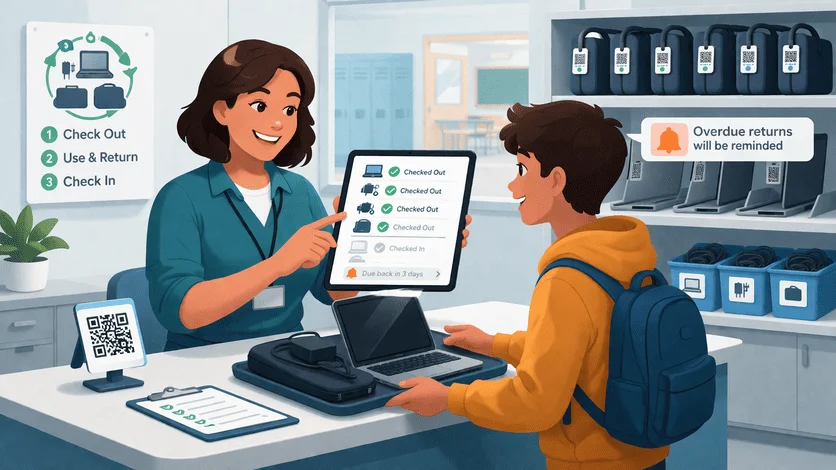
TL;DR
School checkout systems should help your team:
- know who has each device right now
- reduce overdue returns
- avoid missing chargers and adapters
For small IT teams, the best system is one that can launch quickly and is easy for non-technical staff. For vendor shortlisting, use the primary page first: Equipment Checkout Software for Schools (2026 Buyer Guide for Small IT Teams).
If you need migration guidance first, use IT Asset Register Excel Alternative for Small IT Teams.
What a School Checkout System Must Handle
Most school teams need daily control over:
- loaner laptops and tablets
- classroom AV kits
- charging carts and shared peripherals
- short-term project equipment
Without a clear checkout process, equipment loss usually grows through small misses, not one big incident.
Buyer Decision Matrix (Schools, 1-10 IT Staff)
| Decision area | What to check | Why it matters |
|---|---|---|
| Setup effort | Can pilot start this month? | Small teams cannot support long projects. |
| Checkout speed | Can front-office staff process returns quickly? | Slow handoffs create queue and data errors. |
| Return verification | Can staff verify full kit (laptop + charger + case)? | Missing accessories drive repeat loss. |
| Overdue handling | Are reminders automatic? | Manual follow-up burns IT time. |
| Audit logging | Can you export clear borrower/return history? | Needed for audits and leadership reviews. |
| Spreadsheet migration | Is CSV import reliable? | Reduces migration risk and rework. |
For broader evaluation criteria, see Equipment Checkout Software for Schools: Buyer Guide.
2-Week Rollout Checklist
Week 1: Prepare data and process
- Export and clean current spreadsheet.
- Standardize fields: asset ID, borrower, status, due date, returned date.
- Define one checkout flow and one return flow.
- Train one admin/front-desk process owner.
Week 2: Run live pilot
- Start with one asset category (loaner laptops).
- Enable overdue reminders.
- Track return errors daily.
- Run a Friday mini-audit and fix gaps.
Need a checklist format for returns? Use Offboarding Equipment Return Checklist (Laptops + Peripherals).
Common Objections (And Practical Answers)
"We are too small for a system."
Small teams usually get value faster because they cannot afford manual follow-up every day.
"Spreadsheet is good enough."
If ownership and returns are always clear, keep it. If not, a checkout system is the cheaper path.
"Setup sounds heavy."
A single-category pilot removes most rollout risk and shows value in days.
FAQ
Should we track full kits or single items?
Track kits where possible (laptop + charger + adapter). Kit tracking reduces partial returns.
Who should own the checkout process?
Assign one operational owner (IT coordinator or front-office lead) and one IT reviewer.
What metric should we monitor first?
Start with:
- overdue returns count
- missing accessory incidents
- average return closure time
Next Step
If your team wants faster returns and fewer missing items:
Related reading
- Equipment Checkout System Spreadsheet Alternative (For Small IT Teams)
- Asset Tracking for Schools: Buyer Guide for Small IT Teams
- Asset Management Software for Schools (What Small IT Teams Actually Need)
- School Asset Tracking Software Comparison (Small IT Team Shortlist)
- IT Asset Register Template (CSV) for Small IT Teams
- Laptop / Peripheral Kit Checklist (Template for Offboarding Returns)
- Inventory Control Tools for Small IT Teams: Buyer Guide
Methodology
- This page was reviewed against adjacent InvyMate workflow pages and the external references listed below.
- Recommendations are written for practical asset-tracking operations and are intended to stay specific about workflow scope, tradeoffs, and implementation boundaries.
- This page was reviewed as a comparison or buyer-evaluation page, so the emphasis is on workflow fit, rollout effort, and operational tradeoffs rather than feature-list breadth.
Related Standards and Guidance
- Criteria for Distinguishing Equipment From Supply Items · National Center for Education Statistics
- Handbook for Property Management · U.S. Department of Education
Try InvyMate
Start tracking assets with QR codes and scheduled audits.