Comparisons
Asset Panda vs InvyMate for Small IT Teams
Compare Asset Panda and InvyMate for small IT teams by setup speed, accountability workflows, audits, and spreadsheet replacement fit.
Capture Asset Panda comparison intent while keeping the page focused on rollout speed, accountability, audits, and spreadsheet replacement fit.
- Inventory Tech Stack Hub · hub overview
- Inventory Management Tools for Small IT Teams Comparison · related article
- Inventory Management Analysis Tools for Small IT Teams · related article
- IT Asset Management Checklist for Small IT Teams Guide · related article
Audience: Small IT teams comparing configurable asset platforms against simpler hosted asset tracking
Spreadsheet Inventory Limitations · guide
Custom Fields · feature page
Asset Panda and InvyMate both help teams move away from spreadsheets, but they are designed with different priorities in mind. This comparison is written for small IT teams that need reliable asset accountability without turning asset tracking into a lengthy implementation project.
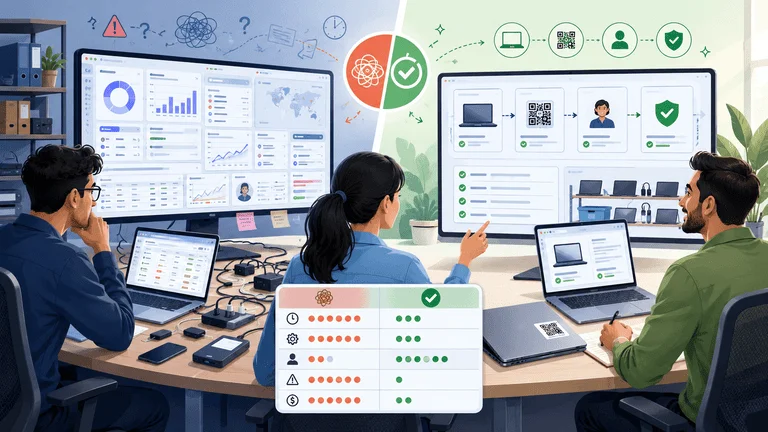
Editorial note: This comparison is based on publicly available information and is intended to help small teams evaluate products based on their workflow. Product capabilities and pricing may change over time.
Quick Take
- Choose InvyMate if your primary goal is tracking laptops, peripherals, shared equipment, employee assignments, returns, and audits with a small IT team.
- Consider Asset Panda if you need a configurable asset management platform across a broader range of asset types and business workflows.
- Don't compare products only by feature lists. Compare how quickly your team can establish and maintain accurate asset records.
InvyMate focuses on practical asset accountability: who has the item, where it is, when it was last verified, and what action comes next.
Typical Fit Comparison
| Decision area | InvyMate | Asset Panda |
|---|---|---|
| Best fit | Small IT and operations teams | Teams managing broader asset workflows |
| Primary focus | Fast asset accountability | Flexible asset management workflows |
| Common use case | Laptops, monitors, chargers, shared equipment | Organizations managing diverse asset types |
| Typical rollout | Start with core asset tracking | May involve additional workflow customization depending on requirements |
| Buying question | "Can we replace spreadsheets this month?" | "Do we need broader asset management flexibility?" |
This table is intended as a guide to typical use cases rather than a definitive feature comparison.
Understanding the Different Approaches
Asset Panda is widely used for asset management across different industries and supports configurable workflows, mobile asset tracking, reporting, and management of multiple asset categories. Organizations with diverse operational requirements may find that flexibility valuable.
InvyMate takes a more focused approach for small IT and operations teams. Instead of optimizing for extensive customization, it emphasizes straightforward ownership tracking, QR-based workflows, recurring audits, and equipment returns.
Neither approach is universally better. The right choice depends on your team's priorities, available time, and operational complexity.
When InvyMate Is the Better Fit
InvyMate is a strong fit when your team primarily needs to manage everyday IT equipment with minimal overhead, including:
- employee equipment assignment
- QR-based lookup and updates
- offboarding returns
- shared equipment accountability
- recurring audits
- spreadsheet migration
- simple role-based permissions
If your team already struggles with spreadsheet drift, you may also find these guides useful:
When Asset Panda May Be the Better Fit
Asset Panda may be a good fit for organizations that want a configurable asset management platform spanning multiple asset types and business processes.
When evaluating any highly configurable platform, it's worth asking:
- Who will maintain workflows?
- Who will manage custom fields and reporting?
- Who will train new users?
- Who will keep asset records accurate over time?
Those questions apply to any configurable system and are often just as important as the feature list itself.
Many small IT teams do not have a dedicated asset administrator. In those environments, choosing software that matches the team's available time and resources can be just as important as choosing the platform with the longest feature list.
The Rollout Test
Before choosing either product, consider running a two-week pilot.
| Week | What to test | Success signal |
|---|---|---|
| 1 | Import one asset category | Records are clean enough to trust |
| 1 | Assign assets to people | Staff can quickly identify ownership |
| 2 | Run a small audit | Missing and unverified items are visible |
| 2 | Complete an equipment return | Offboarding does not depend on memory |
If the pilot takes longer than expected, the challenge is often the implementation process rather than the software alone.
A Small-Team Scenario
Imagine a company with:
- 180 laptops
- 120 monitors
- 90 docking stations
- dozens of chargers and accessories
Two IT staff support the entire business. One handles onboarding and user support. The other manages purchasing, equipment returns, and periodic audits.
In that environment, additional configurability delivers value only if the team has the capacity to maintain it over time.
A practical first objective is often much simpler:
- clean the laptop and peripheral inventory
- identify the current owner and location
- label frequently moved equipment
- complete one verification session
- establish a repeatable offboarding process
That pilot quickly shows whether the software fits the team's daily work without requiring excessive ongoing administration.
Feature Depth vs Daily Operations
Different products prioritize different strengths.
Some organizations benefit from extensive customization because their asset processes vary across departments. Others gain more value from a simpler workflow that encourages consistent day-to-day use.
For many small IT teams, good operating discipline means:
- no asset enters active use without an owner
- no equipment checkout happens without a return expectation
- no audit ends with unresolved "maybe" records
- no offboarding closes until equipment is verified
- no spreadsheet remains the unofficial source of truth
When comparing products, consider how well each one supports the habits your team wants to build rather than simply counting features.
Why Feature Lists Can Be Misleading
Traditional comparison tables often reduce products to yes/no feature checklists.
In practice, two systems may both support reporting, mobile access, QR labels, or workflow customization while requiring very different levels of effort to implement and maintain.
Instead of comparing features alone, consider operational questions such as:
| Question | Why it matters |
|---|---|
| Can we launch one asset category within two weeks? | Helps avoid long implementation projects |
| Can non-admin staff update common fields? | Keeps records accurate |
| Can we identify overdue returns quickly? | Improves accountability |
| Can we export audit evidence? | Simplifies reporting |
| Can we replace spreadsheet habits? | Improves long-term data quality |
These questions keep the evaluation focused on outcomes instead of feature counts.
Migration Risk
For many organizations, the highest migration risk isn't learning new software. It's cleaning existing data.
Before migrating, review your current inventory for:
- duplicate assets
- missing serial numbers
- former employees still listed as owners
- retired assets still marked as active
- duplicate location names
- notes fields being used as unofficial status indicators
If cleanup looks substantial, consider migrating one asset category at a time rather than attempting everything at once.
FAQ
Is Asset Panda too complex for small teams?
Not necessarily. Many small teams successfully use configurable asset management platforms. The key question is whether your organization expects to benefit from additional customization or prefers a faster rollout with fewer configuration decisions.
Is InvyMate only for IT assets?
InvyMate is primarily designed for small-team asset workflows such as assigned equipment, shared assets, QR-based lookup, recurring audits, and equipment returns. It can also support broader operational assets, although it is not intended to replace warehouse inventory systems or ERP platforms.
Should pricing be the first comparison?
Pricing is important, but workflow fit often has a greater long-term impact. Even an inexpensive product can become costly if your team continues spending hours every week reconciling spreadsheets or correcting inaccurate records.
Questions to Ask Before Buying
Before selecting any asset management platform, ask:
- How many people will maintain asset records each week?
- Can we import our existing spreadsheet cleanly?
- Can non-technical staff update assets without extensive training?
- Can we quickly identify overdue returns and unverified equipment?
- Can we export records for audits and management reviews?
For a broader comparison across multiple vendors, see Inventory Management Tools for Small IT Teams Comparison.
InvyMate's Focus
InvyMate is designed to solve a specific problem: helping small IT and operations teams maintain accurate asset ownership, QR-based workflows, recurring audits, and equipment accountability without unnecessary complexity.
It is not intended to be an ERP module, a warehouse inventory platform, or a highly customizable enterprise asset management system.
For organizations that simply want reliable asset tracking with minimal administrative overhead, that focused approach may be an advantage.
Next Step
If you're comparing Asset Panda and InvyMate, base your decision on the first 30 days rather than the next three years.
Can your team:
- import a clean asset list?
- assign equipment to people and locations?
- update assets during everyday work?
- complete an audit?
- close an offboarding return?
Then choose the platform that best matches your team's workflow, available time, and long-term maintenance expectations.
Related reading:
- Inventory Management Analysis Tools for Small IT Teams
- Role-Based Permissions in Inventory Systems
- IT Asset Management Checklist for Small IT Teams
Methodology
- This page was reviewed against adjacent InvyMate workflow pages and the external references listed below.
- Recommendations are written for practical asset-tracking operations and are intended to stay specific about workflow scope, tradeoffs, and implementation boundaries.
- This page was reviewed as a comparison or buyer-evaluation page, so the emphasis is on workflow fit, rollout effort, and operational tradeoffs rather than feature-list breadth.
Related Standards and Guidance
- CIS Critical Security Control 1: Inventory and Control of Enterprise Assets · Center for Internet Security
- NIST SP 800-171 Rev. 3 · NIST
Try InvyMate
Start tracking assets with QR codes and scheduled audits.