Comparisons
Inventory Management Tools for Small IT Teams Comparison
Use this shortlist comparison to compare inventory management tools for small IT teams by setup speed, admin load, and spreadsheet-replacement fit.
If you already have a shortlist, this page helps you compare inventory tools for a small IT team by setup effort, day-to-day workflow, and spreadsheet-replacement fit. It is the shortlist page for this cluster, not the broad buyer guide.
TL;DR
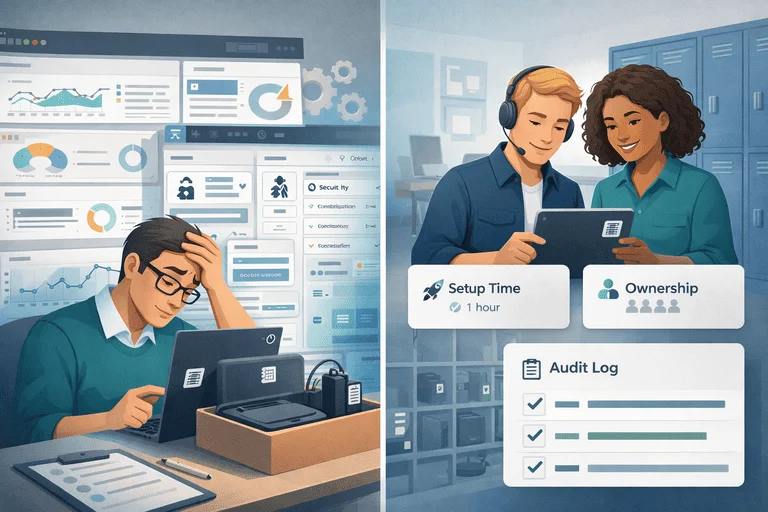
For small IT teams, a good inventory tool should:
- launch in 1-2 weeks
- make ownership and return status obvious
- reduce manual spreadsheet cleanup
If a tool needs months of setup before value, it is usually not the right fit.
If you are still on spreadsheets, start with IT Asset Register Excel Alternative for Small IT Teams.
Primary comparison page for broad tool-intent: Top 10 Inventory Management Tools for Small IT Teams.
What to Compare First
Ignore feature overload in the first pass. Compare only what affects operations this month:
- setup time
- check-out/check-in simplicity
- assignment and return visibility
- reporting for audits
- total admin effort per week
Comparison Table: Small-Team Fit
| Area | Lightweight tool fit | Heavy enterprise fit |
|---|---|---|
| Setup time | Days to 2 weeks | Weeks to months |
| Daily usage | Simple for non-technical users | Often process-heavy |
| Data model | Enough for ownership and audits | Broad but harder to maintain |
| Integration expectation | ERP-light / API-ready | ERP-centered |
| Admin overhead | Low to moderate | Moderate to high |
| Best for | 1-10 IT staff, fast rollout | Large IT organizations |
If you are deciding between standalone software and ERP modules, use Asset Tracking Software vs ERP Modules: What to Choose?.
30-Minute Selection Flow
- List your top 3 current issues (for example: overdue returns, missing chargers, audit prep time).
- Shortlist tools that can launch inside 2 weeks.
- Score each tool 1-5 on setup speed, workflow clarity, and accountability.
- Remove tools that require major customization before pilot.
- Run one category pilot and compare weekly admin time before vs after.
Spreadsheet Replacement Triggers
Move now if 2 or more are true:
- multiple people update the sheet each week
- asset ownership is unclear at least once per day
- you keep duplicate rows or stale statuses
- audit prep requires manual reconciliation
- return follow-up is mostly email chasing
For checkout-heavy workflows, use Equipment Checkout System for Schools (Small IT Team Playbook). If you need broader evaluation criteria before picking a workflow, use this equipment checkout software buyer guide.
If your shortlist has already narrowed to vendor-vs-vendor questions, compare the two most relevant small-team options directly:
FAQ
Do we need ERP first?
No. Most small teams improve faster by fixing operational tracking first, then connecting finance workflows later.
Can we migrate gradually?
Yes. Start with one high-churn category and expand after a stable 2-week pilot.
What should we track first?
Start with laptops, chargers, docks, and shared kits because they usually create the highest support load.
Next Step
If you need a practical small-team workflow:
Related reading
- Inventory Control Tools for Small IT Teams: Buyer Guide
- Inventory + Accounting Integration Without ERP (Small Teams)
- How Cloud-Based Asset Tracking Beats On-Premise Solutions
- IT Asset Audit Checklist (for Small IT Teams)
- Minimum Viable IT Asset Management (MV-ITAM) for Small IT Teams
Methodology
- This page was reviewed against adjacent InvyMate workflow pages and the external references listed below.
- Recommendations are written for practical asset-tracking operations and are intended to stay specific about workflow scope, tradeoffs, and implementation boundaries.
- This page was reviewed as a comparison or buyer-evaluation page, so the emphasis is on workflow fit, rollout effort, and operational tradeoffs rather than feature-list breadth.
Related Standards and Guidance
- CIS Critical Security Control 1: Inventory and Control of Enterprise Assets · Center for Internet Security
- NIST SP 800-171 Rev. 3 · NIST
Try InvyMate
Start tracking assets with QR codes and scheduled audits.