Integrations
Inventory Management Integration Checklist for Teams
A practical checklist for small IT teams to integrate inventory and accounting data without ERP-heavy rollouts.
If your inventory data and finance records are disconnected, this checklist helps small IT teams set up practical integration without a full ERP rollout.
TL;DR
Use this page if your team needs to:
- sync inventory changes with accounting tools
- reduce manual export/import work
- keep audit and ownership records consistent
For 1-10 IT staff, the best approach is ERP-light:
- stabilize asset tracking workflow first
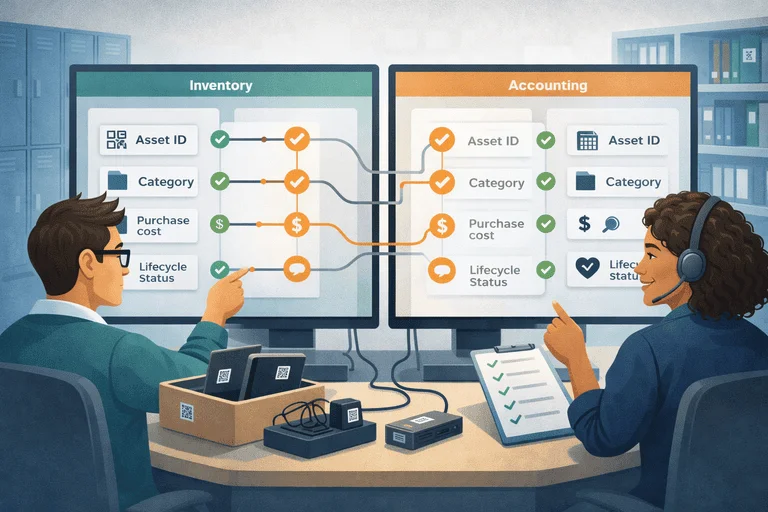
- sync only high-value fields
- verify weekly with one checklist
If you are still spreadsheet-first, start with IT Asset Register Excel Alternative for Small IT Teams.
Why Integration Projects Fail for Small Teams
Most failures happen because teams try to sync everything at once.
Common issues:
- unclear source of truth for asset status
- too many fields synced without ownership rules
- no weekly validation routine
- finance and IT teams using different category logic
Checklist: Before You Integrate
| Check | Why it matters |
|---|---|
| One system owns live asset status | Prevents conflicting updates |
| Required fields are standardized | Avoids sync errors and nulls |
| Asset categories map to finance categories | Keeps reporting consistent |
| Team assigns one integration owner | Creates accountability |
| Weekly validation session is scheduled | Catches drift early |
Minimum Field Set to Sync
For most small IT teams, start with:
- asset ID
- category
- purchase date
- purchase cost
- lifecycle status (active/retired/disposed)
- disposal/write-off date (if applicable)
Do not sync every field in phase one. Keep it operational.
2-Week Integration Rollout
Week 1: Prepare and map
- Clean current inventory records.
- Confirm category mapping with finance.
- Choose your sync direction (inventory -> accounting, or bi-directional where needed).
- Run test sync with one category.
Week 2: Launch and verify
- Enable live sync for chosen category.
- Track failed sync events daily.
- Run one weekly validation session.
- Expand only after mismatch rate is low.
For a deeper accounting-specific walkthrough, see Inventory + Accounting Integration Without ERP (Small Teams). That page is the primary commercial destination for this cluster and should be your first stop before implementation details: Inventory + Accounting Integration Without ERP (Small Teams).
Mini Decision Table: ERP-Lite vs ERP-Heavy
| Decision factor | ERP-lite integration | ERP-heavy rollout |
|---|---|---|
| Time to value | 1-2 weeks | Multi-month |
| Team requirement | 1-10 IT staff | Dedicated admin team |
| Operational risk | Lower | Higher during rollout |
| Best fit | Fast control and clean records | Large cross-department transformations |
FAQ
Do we need bi-directional sync from day one?
Usually no. Start one-directional, then add complexity only if real workflow requires it.
Which team should own integration checks?
Assign one IT owner and one finance reviewer for weekly validation.
What KPI shows integration is healthy?
Track:
- sync failure count
- unresolved field mismatch count
- time spent on manual reconciliation
Next Step
If you want a practical integration workflow without enterprise overhead:
Related reading
- Inventory Integration Checklist for Small Teams (ERP-Lite Setup)
- Inventory + Accounting Integration Without ERP (Small Teams)
- Asset Tracking Software vs ERP Modules: What to Choose?
- Inventory API Integrations: How APIs Connect Modern Systems
- Inventory Management Analysis Tools for Small IT Teams (Buyer Comparison)
- Integrating Inventory with HR: Tracking Devices by Employee
- IT Asset Management Checklist for Small IT Teams (60-Minute Weekly Flow)
Methodology
- This page was reviewed against adjacent InvyMate workflow pages and the external references listed below.
- Recommendations are written for practical asset-tracking operations and are intended to stay specific about workflow scope, tradeoffs, and implementation boundaries.
- This page was reviewed as an integration and systems-boundary guide, with the expectation that smaller teams may need ERP-light or staged implementation paths.
Related Standards and Guidance
- IAS 16 Property, Plant and Equipment · IFRS Foundation
- NIST SP 800-171 Rev. 3 · NIST
Try InvyMate
Start tracking assets with QR codes and scheduled audits.